

Finally, the long-awaited WordPress update(version 7.0) is arriving this month!
And with it, it’s bringing some of the most anticipated features and structural changes, including AI. It will be the first major update of 2026.
So without further ado, let’s dive straight into the topic and discuss everything you need to know about the WordPress 7.0 update.
WordPress 7.0 Update Release Date & Roadmap
The 7.0 update is slated as the first major core release of 2026.
The final release of WordPress 7.0 is scheduled for April 9, 2026. However, the Make WordPress Core platform indicates that the final phases, including Release Candidate 3 and the ultimate launch, have been delayed.
They have stated that this delay is to ensure maximum stability and thorough testing of the complex new infrastructure.
The primary focus during this roadmap has been on stabilizing real-time collaborative editing, rolling out the WP AI Client, and modernizing the administrative experience.
Project leadership has prioritized quality and stability over strict deadlines. Meaning the final launch will be delayed until the core software meets stringent performance standards.
WordPress Update Timeline
The developmental cycle for this major WordPress version followed a structured trajectory of Alpha, Beta, and Release Candidate stages.
Here’s a breakdown of this entire timeline of WordPress 7.0 update:
| Phase | Date | Milestone Description |
| Alpha | November 12, 2025 | Trunk opened for initial development and feature merging. |
| Beta 1 | February 19, 2026 | Focus shifts to testing; dev notes and About page drafting begin. |
| Beta 2 | February 26, 2026 | Continued bug fixing, testing, and documentation updates. |
| Beta 3 | March 5, 2026 | Further stabilization of core features and issue resolution. |
| Beta 4 | March 12, 2026 | Final beta testing phase before release candidates. |
| Release Candidate 1 | March 19, 2026 | Field Guide published, hard string freeze, release branched. |
| Release Candidate 2 | March 26, 2026 | About page images updated; release post drafting continues. |
| Release Candidate 3 | April 2, 2026 (Delayed) | Final polishing and pre-launch checks. |
| Dry Run | April 8, 2026 (Delayed) | 24-hour code freeze and deployment rehearsal. |
| Final Release | April 9, 2026 (Delayed) | Official public launch of WordPress 7.0. |
Key Features of the Upcoming WordPress Update 7.0
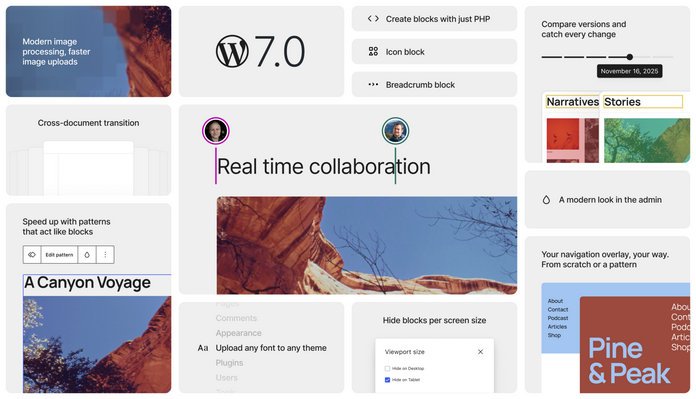
The WordPress 7.0 update delivers comprehensive upgrades to the administrative dashboard, developer tools, and the end-user editing experience. The focus was heavily on modernizing workflows and establishing a foundation for the next decade of web development.
Here’s what’s new in WordPress 7.0 update:
1. Real-Time Collaboration and Notes
At the heart of Gutenberg Phase 3 is a push toward seamless teamwork. The new update introduces the foundation for real-time collaboration. This allows multiple users to co-edit posts simultaneously without locking each other out.
Complementing this is the enhanced Notes system. Editors can leave comments on specific text fragments or blocks. They can also tag teammates with @mentions and manage feedback directly in the editor.
This dramatically reduces the need for external tools like Google Docs or Slack for content review.
2. WP AI Client and Abilities API
Rather than building a basic AI writing assistant, WordPress 7.0 integrates a provider-agnostic native AI infrastructure.
The WP AI Client serves as a standardized API layer. This allows themes and plugins to connect effortlessly with external AI models like OpenAI, Claude, or Gemini.
Furthermore, the Client-Side Abilities API, which supports the Model Context Protocol (MCP), acts as a registry. It tells external AI agents exactly what actions the specific WordPress installation can perform, such as retrieving drafts or modifying media.
3. Client-Side Media Processing
Historically, image processing tasks, like resizing and compression, occurred on the server. Thus, consuming valuable hosting resources. WordPress 7.0 shifts this workload to the client side.
Media files are now optimized, resized, and converted to modern formats right inside the user’s browser before the upload even completes.
This drastically improves upload speeds and reduces the server load for media-heavy websites.
4. DataViews and Modern Admin Redesign
The traditional WordPress administrative dashboard receives a significant modernization with DataViews.
Old WP List Tables are replaced with a fast, app-like interface. Users can filter, sort, and group their content dynamically without refreshing the page.
The update also provides multiple layout options, including grid, table, and list views. Such changes offer a highly customizable back-end experience.
5. Responsive Editing and New Blocks
Designers gain granular control with the new Responsive Editing Mode. This allows users to show or hide specific blocks based on the visitor’s screen size without writing custom CSS.
Additionally, this update introduces highly requested core blocks.
The new Breadcrumbs block creates structured navigation paths instantly, while the Icons block allows for scalable, accessible vector graphics.
The core Heading block has also been converted into Block Variations, allowing users to select specific heading levels (H1-H6) directly from the block inserter.
6. Centralized Connectors Dashboard
Managing external API keys used to require digging through various plugin settings. Version 7.0 solves this administrative headache by introducing a unified Connectors screen.
Site administrators can now securely manage, audit, and update credentials for third-party services and AI integrations from one centralized location.
How to Beta Test WordPress 7.0 Update
Since beta and release candidate versions are under active development, you should never test them on a live production website. Especially since the WordPress vulnerabilities in 2026.
That’s why testing an upcoming major release is crucial for theme developers, plugin authors, and agency owners who want to ensure compatibility before the public launch. Here’s how:
- Set up a staging site or a local server. Never install beta software on a live production website.
- Go to Plugins > Add New in your WordPress dashboard.
- Search and install the official WordPress Beta Tester plugin.
- Activate the plugin.
- Navigate to Tools > Beta Testing.
- Select the Bleeding Edge channel and choose the Beta/RC Only stream.
- Save your settings.
- Go to Dashboard > Updates and click Check Again.
- Follow the prompts to install the latest 7.0 Beta or Release Candidate.
Alternatively, you can download the specific Beta or RC ZIP file directly from the release page and install it manually.
Frequently Asked Questions
What’s new in WordPress 7?
WordPress 7.0 introduces real-time collaboration workflows, a native AI integration framework, client-side media processing, and an app-like administrative redesign utilizing DataViews.
Is 2GB RAM enough for WordPress 7.0?
Yes, 2GB of RAM is sufficient for standard WordPress 7.0 installations, though large-scale sites utilizing heavy real-time collaboration or extensive AI plugins will benefit from more memory.
Is WordPress 7.0 Beta stable?
No, beta versions contain unresolved bugs and are intended solely for testing in safe staging environments, not for live production websites.
Why is WordPress 7.0 final release delayed?
The final release was delayed to give developers additional time to test the complex real-time collaboration infrastructure and to ensure the new AI APIs meet strict stability standards.
Bottom Line
The WordPress 7.0 update is a monumental leap forward that redefines how teams interact with the platform. By integrating native AI protocols and paving the way for real-time co-editing, it completely modernizes the digital workspace.
But before diving into this awesome update, website administrators and developers must thoroughly test their current systems.