

Websites have become the frontier for business, education, and whatnot. And as they’ve grown, so has the number of threats like DDoS attacks, malware injection, encryption vulnerabilities, etc.
This is particularly true for WordPress websites, which make up over 40% of the entire internet. Their popularity and the widespread use of plugins/themes make them prime targets for hackers.
A WAF (Web Application Firewall) is the only thing that can protect your sites against malicious attacks.
But what is this WAF, and how can you use it to safeguard your WP sites?
Let’s dive into this article and find out.
What is WAF(Web Application Firewall)?
A Web Application Firewall, or WAF for short, is a specialized website security solution. It filters and monitors HTTP traffic between a web application and the internet.
Unlike traditional firewalls that protect the network layer, a WAF operates at the application layer. As a result, it can inspect requests to ensure that malicious data does not reach the server.
Think of it as a bouncer in a nightclub. A bouncer only allows the right kind of people and stops the creeps and freaks from entering the club.
Similarly, WAF acts as a gatekeeper for your website. It only allows legitimate requests and blocks potentially harmful ones.
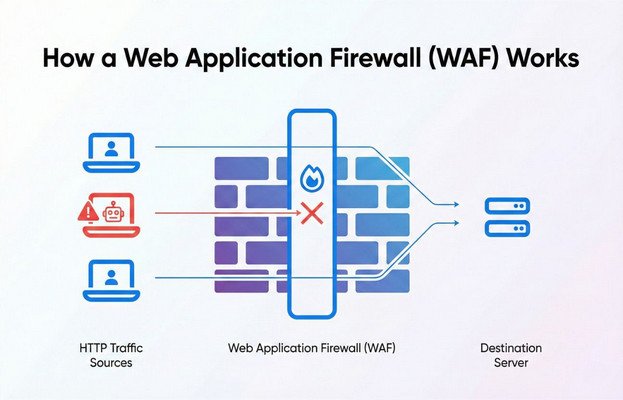
To be blunt, it uses a set of rules and signatures to identify threats, such as SQL injection, Cross-Site Scripting (XSS), and other attacks designed to exploit weaknesses in web applications.
Different Types of Web Application Firewalls
There are different types of Web Application Firewalls on the market. However, these can be sorted into three categories. Such as:
- Cloud-Based WAF: These WAFs are hosted in the cloud and offer easy deployment without complex infrastructure. WordPress websites often use them for their convenience and scalability.
- Hardware-Based WAF: Also referred to as network-based, these WAFs are usually installed in local area networks (LANs) and deployed through physical hardware. They offer robust protection but are more expensive and complex to maintain.
- Software-Based WAF: These WAFs are located within Virtual Machines (VMs) and provide a customizable approach. This flexibility allows these web app firewalls to be deployed on both physical servers and the cloud.
Among these, network/hardware-based WAFs are ideal for WordPress websites due to their fast speed and reliable performance. However, it costs a fair bit more compared to other options.
Hence, hardware-based WAFs are mostly used for organizations or businesses with higher traffic.
How does a Web Application Firewall Work?
In short, a Web Application Firewall’s working principle basically boils down to filtering and monitoring HTTPS traffic to prevent malicious attacks.
It inspects the payload of each request. It analyzes headers, cookies, and POST data for abnormalities or code injection attempts. For instance, a Web Application Firewall might block a request containing a malicious SQL query intended to manipulate a database.
To elaborate, it operates primarily at the application layer (Layer 7 of the OSI model). Hence, while traditional firewalls only focus on network security(Layer 3 & 4), WAF safeguards the layer where applications run code to perform various actions on the web server.
Furthermore, some core functionalities of a WAF include:
- Request Monitoring: Every incoming request is analyzed for potential security risks. The WAF looks for unusual patterns or anomalies that indicate a potential attack, such as excessive requests from a single IP address or request files containing suspicious logic.
- Filtering and Blocking Malicious Traffic: WAFs use signatures (patterns of known attacks) and behavioral analysis to block threats. If a request matches a known attack signature, the WAF can block it in real-time.
- Learning Modes and Adaptive Protection: Many advanced WAFs in the market utilize machine learning to adapt to new types of attacks. WAFs can improve their threat detection capabilities by continuously training the AI model from the data they process.
- Real-Time Threat Intelligence: Some WAFs are connected to networks that share information about emerging threats. By using this collective intelligence, they can provide proactive protection against zero-day vulnerabilities.
Hence, by continuously analyzing traffic, Web Application Firewalls ensure that legitimate users can access applications while malicious requests are blocked.
WAFs Vs. Next-Generation Firewalls Vs. Firewalls
Web Application Firewalls (WAFs), Next-Generation Firewalls (NGFWs), and traditional firewalls focus on securing network traffic. However, they operate at different layers and provide distinct types of protection.
For a more comprehensive approach, let’s take a look at the side-by-side comparison of WAF vs next-gen firewalls vs traditional firewalls:
| Attributes | Web Application Firewall | Next-Gen Firewall | Traditional Firewall |
| Layer | Primarily operates at Layer 7 (Application Layer) of the OSI model | Operates across multiple layers (typically Layers 3-7) but with advanced features beyond traditional firewalls | Primarily operates at Layers 3-4 (Network and Transport Layers) |
| Functionality | Inspects and analyzes HTTPS traffic | Deep packet inspection, intrusion prevention system (IPS), application awareness | Uses basic network perimeter security to prevent unauthorized access to internal networks |
| Application Awareness | Yes (web applications only) | Yes | No |
| SSL Decryption | Yes | Yes | No |
| Focus | Block requests that attempt to exploit vulnerabilities within web applications | Inspect traffic for malware and can block network-level attacks | Packet filtering, uses rules to allow or block traffic based on IP addresses, ports, and protocols. |
| Intrusion Prevention System (IPS) | No | Yes | No |
| Protection Type | Prevents application-layer attacks. Such as SQL injection, cross-site scripting (XSS), cross-site request forgery (CSRF), and remote code execution. | Detect and block malware, phishing, and intrusions | Block traffic from a specific IP, prevent connections to a specific port, and block SSH (port 22) or HTTP (port 80) requests from suspicious sources. |
| Use Case | Web application protection | Comprehensive network security | Basic network protection |
| Best For | Websites and web applications | Enterprises with complex networks | Small to medium networks |
In short, WAFs are tailored for web applications while NGFWs offer broader and deeper network protection. On the other hand, traditional firewalls serve as basic network security.
Why Do WordPress Sites Need a Web Application Firewall?
People usually gravitate towards the more popular products. The same goes for hackers, who target larger install bases to have a bigger impact.
Furthermore, according to WPZOOM, around 43.5% of global websites use WordPress as their CMS(Content Management System). Hence, WordPress websites have become prime targets for hackers and cyberattacks.
As more and more companies become web-based services, these threats are becoming more and more prominent. In 2024, the digital industry saw a 30% YoY increase in total cyberattacks compared to last year, with around 343 million victims. (Source: Check Point)
Such issues also make people concerned about whether WordPress is secure or not.
And that’s not all!
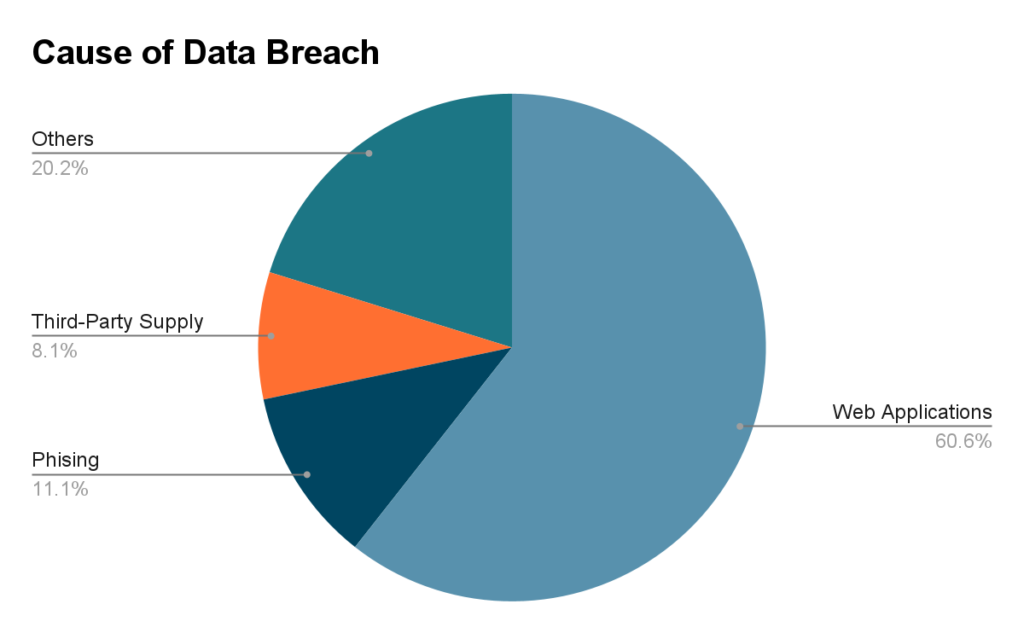
According to Verizon’s report on cybersecurity, almost 60% of data breaches occur due to vulnerabilities within web applications. Since WAF is the only security solution that inspects the application layer, it is essential for securing a WordPress website.
How to Protect a WordPress Site with a WAF
The simplest way to incorporate WAF into your WP website is by installing a WordPress plugin and configuring it accordingly. Here’s how:
1. Choose a WAF Plugin Based on Your Needs
The first thing you need to do is to determine your needs and expectations from the WordPress WAF.
Here are some aspects you need to consider to choose the right WAF for WordPress:
- Your budget.
- The type of WAF you want to use.
- The amount of customization and flexibility you want.
Narrow down your decision with the above-listed checklist.
2. Install the Plugin on Your WordPress Account
There are many WAF security plugins for WordPress on the market. However, the installation and setup process for all of them is pretty much the same.
For demonstration, I have chosen Wordfence, one of the most popular WP WAFs. The free version has everything you’ll need.
Follow these steps to install the Wordfence WAF on your WordPress account:
- Log in to your WordPress account and click on Plugins from the dashboard.
- Select Add New.
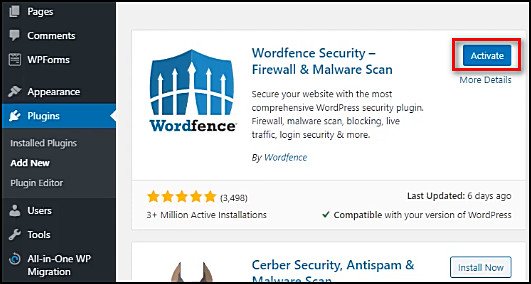
- Type security in the search box. You’ll see Wordfence at the top of the search results.
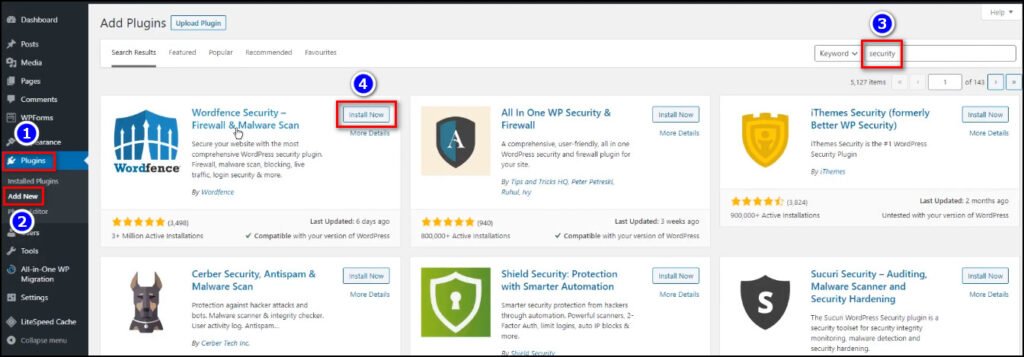
- Click on Install Now. Later on, select Activate.
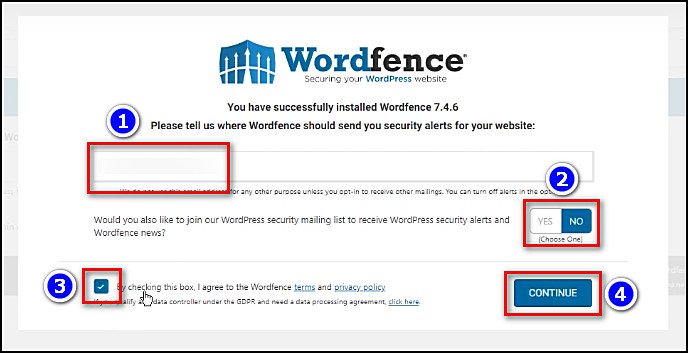
- Type your email address in the designated box.
- Select Yes or No. I’ve chosen No.
- Tick the box for terms and services.
- Click on Continue.
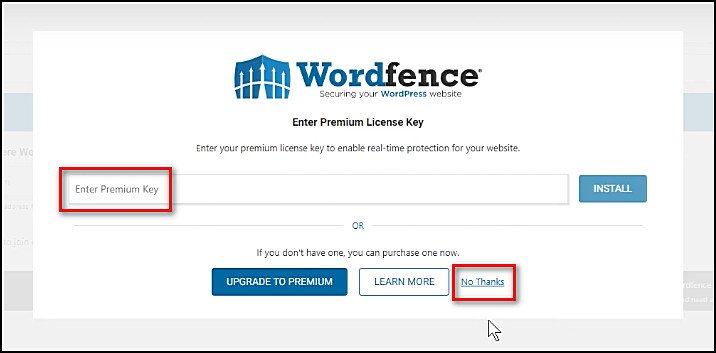
- Enter your premium key if you have any. If not, click on No Thanks to use it as a free version.
That’s it. Now, you need to configure the plugin from the settings.
3. Configure the WAF Plugin
The configuration process of the Wordfence WAF is identical for both free and premium users. Just follow the below-listed steps, and you’re all set:
- Select Wordfence from the dashboard.
- Hit Next if any pop-up tip shows up.
- Click on Click Here to Configure from the top of the page.
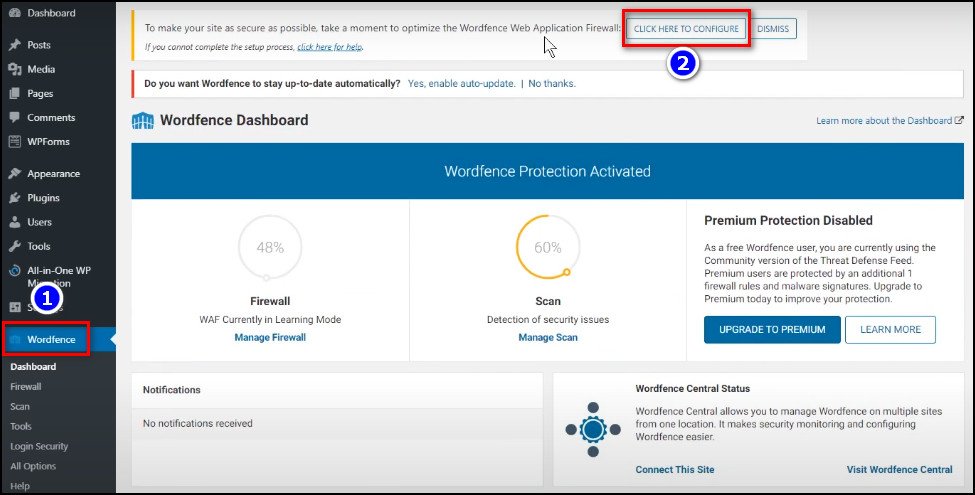
- Hit Continue from the pop-up window.
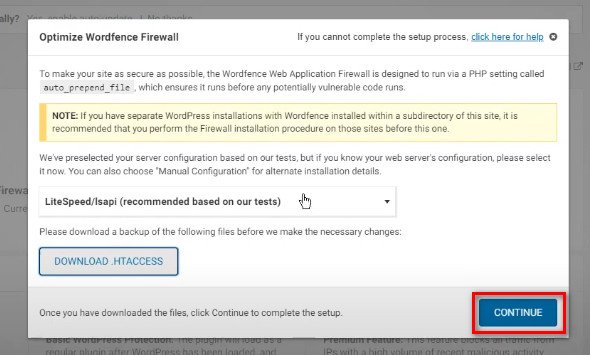
Done! You can further customize the WAF’s functionality by going into the All Options settings from the dashboard’s Wordfence section.
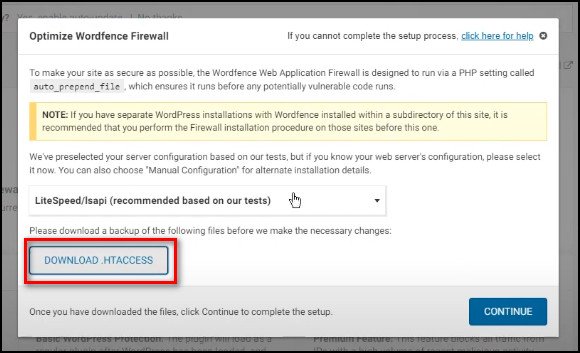
Pro tip: Click on Download.HTACCESSand save the file on your computer before hitting Continue. In case something goes wrong, you can restore the backup file to avoid inconveniences.
Top Free WAF Tools to Secure Your WordPress Websites
There are numerous WAF solutions available for WordPress websites, each offering unique features. Here are three popular choices:
- Cloudflare WAF: A cloud-based solution. It is well-known for its DDoS protection, SSL encryption, and easy integration with WordPress. Its global CDN (Content Delivery Network) also helps improve site performance.
- Sucuri: Sucuri offers a comprehensive security suite for WordPress that includes WAF, malware removal, and monitoring. It’s one of the best WordPress firewalls that provides real-time protection against common threats and includes website backups.
- Wordfence: Specifically designed for WordPress, Wordfence is a plugin-based WAF that offers advanced firewall rules, malware scanning, and brute force attack protection. It’s ideal for those who want a dedicated WordPress solution with frequent updates.
If I have to pick one, I’d say Wordfence stands out as one of the best WordPress firewalls for all the good reasons.
Wrapping Things Up
For WordPress sites, integrating a WAF is not just a good practice; it’s a critical step in building a trustworthy online presence. Simply choose a suitable WAF solution, set it up correctly, and enjoy the peace of mind knowing your website is well-protected.
Anyway, that’s it for today. I hope this write-up has provided all the information you were looking for.
Have a nice day!